You log in to your WordPress website, head to the Updates page, and it proudly tells you everything is up to date. Meanwhile, a plugin update released hours ago is nowhere to be found.
Sound familiar? You are not imagining things.
Why Do I Need To Manually Do This?
WordPress does not always pull updated information instantly. Sometimes you need to manually refresh the update check so your site can “see” the latest available updates.
One of the most common things we see while maintaining WordPress websites is site owners assuming their plugins, themes, or WordPress core are fully updated simply because the dashboard says so.
But WordPress relies on cached update data.
That means your site stores the last time it checked for updates, rather than contacting WordPress.org every time you load the page. This helps reduce server load and speeds things up, but it can also delay new updates from appearing in your dashboard.
If a plugin developer releases an update after your site has already performed its scheduled check, your dashboard may continue showing:
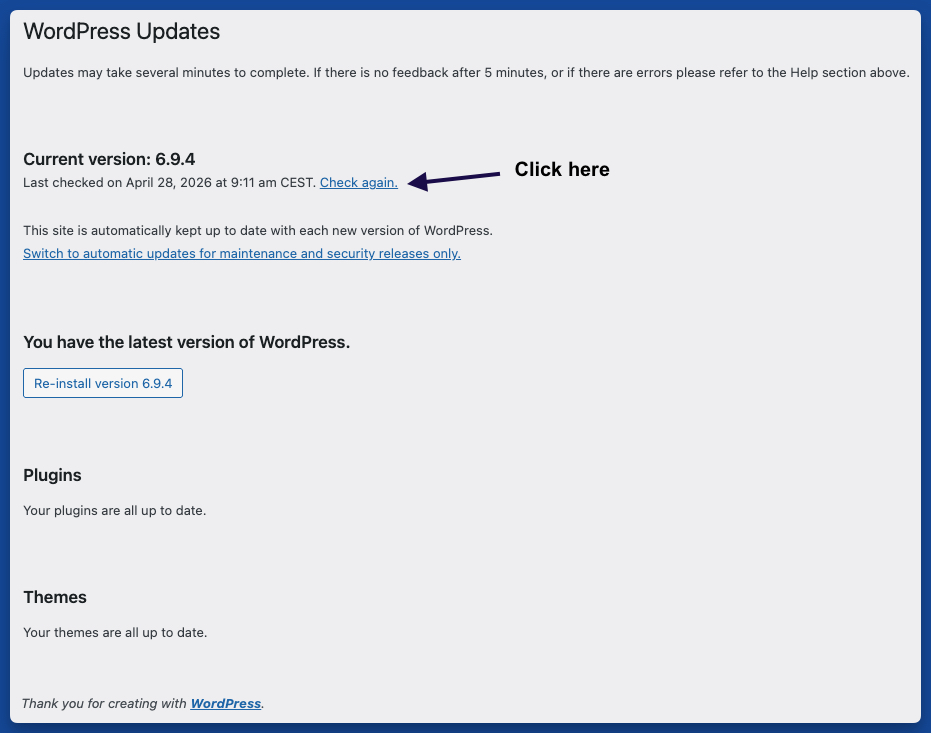
You have the latest version of WordPress.
…even though newer updates are already available.
That is where the small “Check again” link comes in.
What Happens When I Click “Check Again”
By clicking “Check again” on the WordPress Updates page, you force WordPress to perform a fresh update request and pull the latest available plugin, theme, translation, and core updates immediately.
This is especially important when:
- A plugin developer announces a security update
- You are troubleshooting an issue
- You just updated a plugin manually
- You manage multiple WordPress websites
- You are waiting for a newly released update to appear
Think of it like refreshing your email inbox. Sometimes the new message is already there — WordPress just has not checked yet.
Why This Matters For Website Security
Running outdated plugins or themes is one of the fastest ways to expose a WordPress site to security risks.
Many website owners assume automatic updates catch everything instantly. In reality, there can sometimes be delays caused by:
- Cached update transients
- Hosting-level caching
- Cron jobs not running correctly
- Server communication issues
- API timeout problems
A quick manual “Check again” can often solve the problem in seconds.
A Simple Habit That Prevents Bigger Problems
Professional WordPress maintenance is often less about complicated fixes and more about consistent small checks.
Refreshing updates manually before assuming everything is current is one of those habits that saves time, prevents vulnerabilities, and avoids plugin conflicts later.
At WPSlay, this is part of the routine maintenance process we perform regularly for client websites.
If you want your website handled properly without stress, we should talk.